
2026 Checklist: Avoid Common Australian Event AV Mistakes
- Shanaka Tennekoon
- 2 minutes ago
- 11 min read

Did you know that corporate events in Australia exceed their initial budgets by an average of 23 per cent, with hidden technical costs and last-minute gear additions usually to blame? It's a frustrating reality for many organisers who feel the sting of "she'll be right" planning only when the house lights go down and the microphones start to feedback. You've likely felt that knot in your stomach during a live presentation, worrying if the LED wall will glitch or if the remote attendees can actually hear the keynote speaker.
We’re here to transform that anxiety into absolute confidence. This expert checklist is designed to help you master the technical nuances of production, ensuring you identify and bypass the most common event AV mistakes to avoid before they ever reach the stage. We'll guide you through a foolproof plan that ensures perfect sound and visuals for every guest, regardless of whether they are in the room or joining via a hybrid link.
We will explore everything from navigating the latest AS/NZS 62368.1:2026 safety standards to perfecting custom aspect ratios for seamless visuals, providing a clear roadmap for a flawless 2026 show.
Table of Contents
The Pre-Production Phase: Avoiding the "She’ll Be Right" Trap
The "she'll be right" attitude might work for a weekend barbie, but it's a dangerous gamble for a high-stakes national conference. One of the most common event AV mistakes to avoid is assuming the venue's in-house equipment is fit for purpose without a rigorous audit. Often, venue-supplied gear is built for basic utility, not the high-definition impact required for a 2026 production. Engaging your AV partner during the initial concept stage ensures your creative vision aligns perfectly with the physical reality of the space.
Developing a deep understanding of audiovisual technology starts with knowing that a floor plan is never a substitute for a technical site visit. You need to walk the room to spot pillars that block sightlines or acoustic echoes that might muddy your sound. If you wait until the bump-in day to discover a lack of power or a low ceiling, your budget will likely blowout on expensive, last-minute workarounds.
The Venue Assumption Audit
Verify the actual age and maintenance record of the venue's inventory. Projector bulbs dim and mixers can glitch after years of heavy use. You must also check for hidden "patching fees" that some venues charge when you bring in a specialist production partner. Finally, confirm ceiling heights and weight-loading capacities. If you plan to fly a massive LED wall or a complex lighting rig, the building's structural integrity is a non-negotiable safety factor.
Power and Connectivity Infrastructure
High-intensity LED walls and moving light fixtures demand massive amounts of power. Calculate the total amperage early to avoid tripping the venue's main circuit mid-keynote. You should identify the exact location of 3-phase power outlets for your staging needs well before the equipment trucks arrive. For hybrid components, never rely on guest Wi-Fi. Verify a dedicated, hard-wired internet line with guaranteed bandwidth to ensure your stream stays rock-solid for remote attendees. This technical foresight is what separates a professional production from a stressful amateur hour.
Content and Visual Blunders: Beyond the Slide Deck
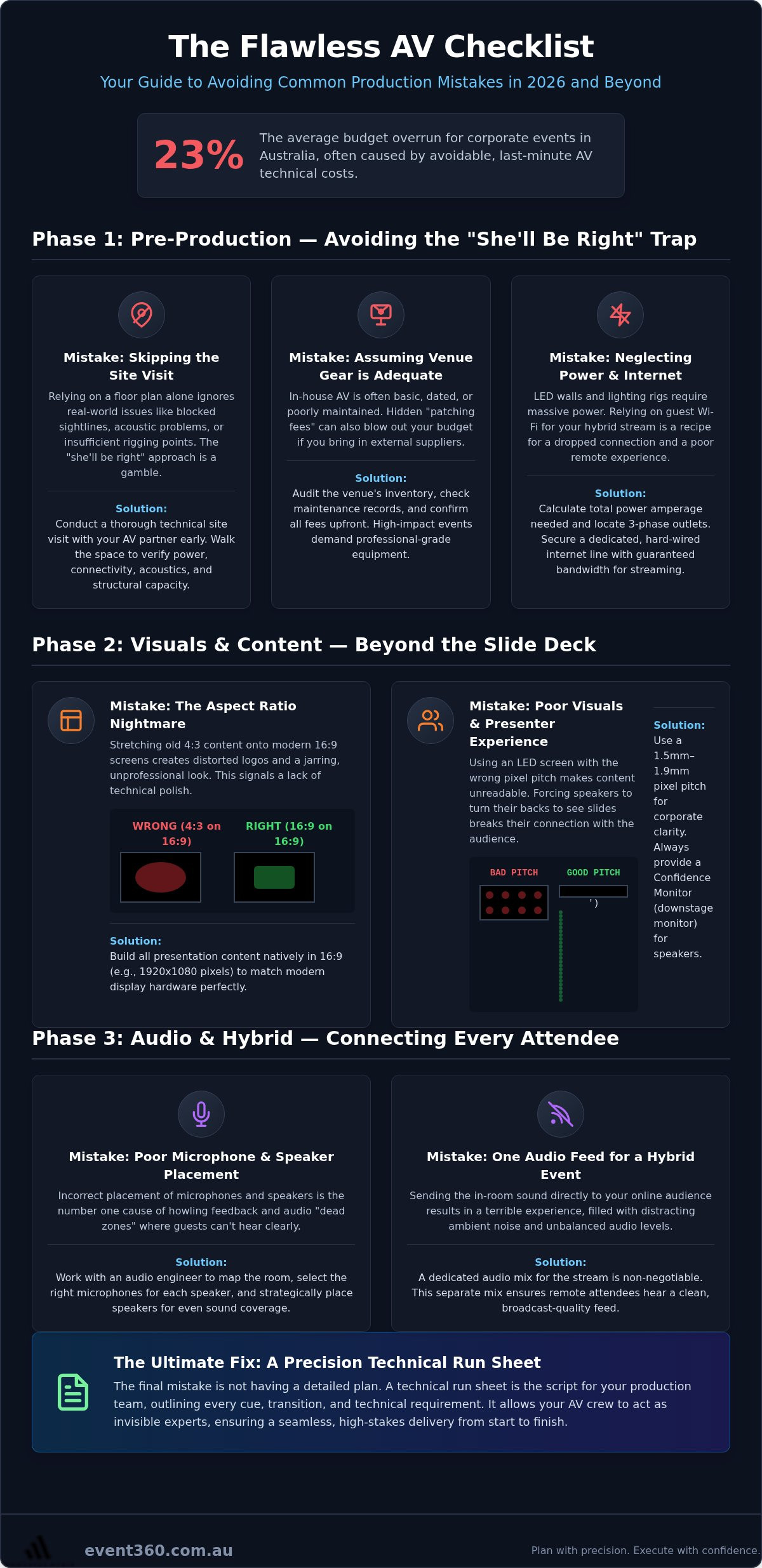
Visual impact defines the professional weight of your production. One of the most common event AV mistakes to avoid is falling into the "Aspect Ratio Nightmare" where 4:3 legacy content is stretched across a modern 16:9 screen. This creates awkward pillar-boxing or distorted logos that immediately signal a lack of technical polish. In 2026, with the Australian standard for desktop resolutions sitting at 1920x1080, your event content must be built to match the native resolution of your display hardware from the very first draft.
Selecting the wrong LED pixel pitch is another frequent error that ruins the audience experience. For most corporate environments, a pixel pitch of 1.5mm to 1.9mm is now the baseline for clarity. If the pitch is too wide for the viewing distance, your text will appear pixelated and difficult to read. Always insist on testing all creative content on the actual display hardware during rehearsals. This is also the time to set up a "Confidence Monitor" or Digital Stage Monitor (DSM). Without one, your keynote speakers are forced to turn their backs to the audience to see their own slides, breaking the connection with the room.
Visual Hardware Matching
Maximise the value of your LED wall hire by ensuring every pixel of your content maps directly to the physical pixels on the screen. This eliminates the blurriness caused by scaling engines. You should enforce a unified template for all presenters to prevent jarring visual shifts between sessions. Be mindful of ambient light; many Australian ballrooms feature stunning glass walls that can wash out traditional projection systems. In these bright spaces, high-output LED solutions are essential to maintain visual pop and legibility.
The Presenter Experience
Provide a dedicated "green room" where technical staff can vet guest laptops and USB drives before they ever reach the stage. This prevents the dreaded "driver not found" error mid-presentation. Ensure your professional "clicker" system has enough range to cover the entire stage area, allowing presenters to move naturally. A dedicated graphics operator serves as the technical fail-safe who ensures every visual transition is crisp, correctly scaled, and perfectly timed with the presenter's speech. If you want to ensure your next show is visually flawless, our team can help you organise a custom visual strategy that brings your creative vision to life.
Sound and Lighting Sins: The Sensory Success Killers
Sound and lighting are the pulse of your production. If you get them wrong, you'll lose your audience's attention before the first coffee break. One of the most common event AV mistakes to avoid is treating audio as a "set and forget" component. High-stakes panel sessions require active, minute-by-minute mixing by a professional audio engineer to balance different vocal tones and prevent the dreaded feedback loop of doom. This is where the value of technical labour becomes clear; you need an expert at the desk who can anticipate a speaker's movements and adjust the gain before a squeal pierces the air.
Precise speaker placement is a science that accounts for room acoustics and microphone pickup patterns. Choosing the wrong mic for the job often leads to disaster. Lapel mics are discreet but can rub on clothing or pick up ambient noise; handhelds offer superior clarity but require the speaker to maintain a consistent distance. In high-density venues with multiple concurrent events, managing Radio Frequency (RF) interference is vital. Our teams perform full-frequency soundchecks in both empty and full rooms because bodies absorb sound, changing the acoustic profile of the space. We also deploy redundant microphone systems for every VIP to ensure the show never stops.
Audio Engineering Excellence
Success in audio requires more than just high-end gear. It demands a rigorous approach to frequency management and signal routing. We ensure that every microphone has a clear pathway and that the sound is distributed evenly across the room, eliminating "dead zones" where the audience might struggle to hear. By having our invisible experts onsite, we can manage the complex logistics of RF coordination, ensuring your microphones don't pick up chatter from the wedding in the ballroom next door.
Lighting Design for Impact
Lighting creates the atmosphere, but it must serve two masters: the physical audience and the camera lens. A common pitfall is designing event lighting that looks stunning in person but leaves presenters looking flat or washed out on the live stream. You must balance stage wash and key lighting to ensure high-definition clarity for your remote viewers. We use light to guide focus throughout the programme, highlighting key moments and branding. It's also essential to map the stage carefully to avoid "blind spots" where a roaming speaker might wander into the shadows, disappearing from both the room and the broadcast.
The Hybrid Gap: Mistakes in Connecting Remote Audiences
Hybrid events are often treated as a live show with a "tacked-on" stream, but this mindset is a massive error. One of the most common event AV mistakes to avoid is treating your virtual audience as mere observers rather than active participants. If they cannot interact with the stage in real-time, they will disengage within minutes. You must bridge the physical and digital divide to create a unified experience that feels premium for every guest.
A frequent technical failure is sending the same audio mix to the room speakers and the online stream. In the ballroom, the sound is tuned for the acoustics of the physical space; on a laptop, that same feed often sounds hollow, muddy, or echoes. Professional productions require a dedicated broadcast mix that accounts for platform-specific audio levels and compression. This ensures your remote attendees hear every word with the same high-definition clarity as those in the front row.
Underestimating latency is another silent killer of hybrid engagement. If your remote Q&A system has a 20-second lag, the moderator has often moved on to the next topic before the virtual question even reaches the stage. You need low-latency streaming solutions and a clear, two-way communication mechanism that allows remote input to reach the presenter instantly. Without this, the "one-way street" error turns your interactive conference into a passive, boring broadcast.
Broadcasting Infrastructure
Elevate your digital presence by utilising professional live streaming services that employ multi-camera switching. This creates a dynamic, TV-quality feel that keeps eyes on the screen and prevents "webcam fatigue". Always ensure a backup internet connection, such as a 4G or 5G failover, is active and ready to take over if the venue's primary hard-wired line wavers. A dedicated digital stage manager is essential for hybrid success, acting as the eyes and ears of the remote audience to coordinate transitions and monitor the feed quality in real-time.
Engaging the Remote Audience
Integrate live polling and chat results directly onto the physical LED screens in the room. This visual connection reminds the in-person crowd of the wider community and proves to remote guests that their voices are being heard. Plan specific "camera-direct" moments where speakers look into the lens to address the virtual crowd, fostering a sense of personal connection. Finally, always test the remote user experience from a standard home internet connection during rehearsals to identify potential buffering or interface issues before your guests login. If you want to ensure your next hybrid show is technically flawless, partner with our broadcasting team to design a seamless digital stage.
The Flawless AV Checklist: Your 2026 Production Roadmap
Turning a complex vision into a seamless reality requires more than just high-end hardware; it demands a meticulous roadmap. One of the most common event AV mistakes to avoid is failing to produce a minute-by-minute technical run sheet that every department follows religiously. This document serves as the "Bible" for your production, ensuring that lighting cues, audio transitions, and visual content changes happen in perfect synchronisation. Without this level of detail, your show relies on guesswork rather than precision.
Professional onsite technical support is non-negotiable for high-stakes MICE events. These invisible experts manage the split-second decisions that keep a show on track when a speaker wanders off-script or a laptop update suddenly triggers mid-session. A full "dress run" rehearsal is your final fail-safe. This protocol allows you to test every transition under show conditions, identifying potential friction points before the audience arrives. Once the house lights come up, the process isn't over. Closing the loop with a post-event debrief and technical data analytics helps you refine future strategies and prove the ROI of your production.
The Technical Run Sheet
Document every cue, transition, and lighting change in a shared master file that is accessible to the entire production crew. Assign a specific lead technician for each department, including Audio, Vision, and Light, to ensure clear lines of accountability. Your run sheet should also include "Plan B" scenarios for equipment failure or speaker no-shows. Having a pre-loaded "Technical Difficulty" slide or a backup audio track ready to go can save your reputation during an unexpected glitch.
Partnering for Success
Evaluate your audio visual production partners based on their creative content capability, not just their gear list. You need an ally who understands how to translate your brand's message into immersive visuals. Confirm that the "bump-in" and "bump-out" schedule aligns perfectly with your venue access to avoid costly overtime fees or rushed setups. Book your av hire as early as possible to secure the best technical labour and the latest 2026-spec equipment. Early engagement allows your production partner to conduct the necessary site visits and infrastructure audits that guarantee a hitch-free event.
Elevate Your Next Production with Technical Precision
Your next major event doesn't have to be a source of technical anxiety. By moving past the "she'll be right" mindset and focusing on rigorous site visits, pixel-perfect content, and dedicated audio mixes, you're already ahead of the competition. We've explored the most common event AV mistakes to avoid, from mismatched aspect ratios that look amateur to the "one-way street" of hybrid disengagement that leaves remote guests in the cold. Now, it's time to put these insights into action with a dedicated partner that thrives in the high-stakes environment of live production.
Event 360 Pty Ltd provides specialist MICE event technical management and reliable national Australian service and support. Our state-of-the-art LED wall and hybrid solutions ensure your creative vision is delivered with absolute clarity and impact. Don't leave your technical success to chance or generic venue solutions. Partner with Event 360 Pty Ltd for a Flawless Production and experience the peace of mind that comes with true technical mastery. Let's work together to make your 2026 show an unforgettable success that runs without a single hitch.
Frequently Asked Questions
What is the most common AV mistake made during corporate conferences?
The most frequent error is inadequate pre-production planning and failing to conduct a full technical rehearsal. Many organisers fall into the trap of assuming everything will work on the day without a cue-to-cue run-through. This is high on the list of common event AV mistakes to avoid because it leads to awkward silences and technical glitches that break the audience's immersion. Dedicating time for a "dress run" ensures every department is perfectly synchronised.
How much time should I allow for AV setup and bump-in at a venue?
You should typically allow a minimum of four to six hours for a standard corporate setup, though large-scale productions with LED walls often require 24 hours or more. The specific time depends on the complexity of your rigging and the venue's access restrictions. Rushing the bump-in is a recipe for disaster, as it leaves no room for troubleshooting equipment failures or adjusting lighting angles once the stage is set.
Do I really need a professional soundcheck if the venue has its own gear?
Yes, a professional soundcheck is essential because venue-supplied equipment often lacks the precision required for high-stakes presentations. Even if the gear is high quality, every speaker has a different vocal profile and every room has unique acoustics that change when people fill the space. Our engineers perform soundchecks in both empty and full rooms to ensure the audio remains crisp and intelligible for every single guest in attendance.
What is the difference between a 16:9 and a 4:3 aspect ratio for presentations?
A 16:9 aspect ratio is the modern widescreen standard, whereas 4:3 is the older, nearly square format used by legacy projectors. Using 4:3 content on a 16:9 screen creates "pillar-boxing" with black bars on the sides, which looks amateur. In 2026, you should ensure all presentation templates are built in 16:9 or custom wide formats to match the native resolution of high-definition LED walls and modern displays.
How can I prevent microphone feedback during a live panel discussion?
Preventing feedback requires precise speaker placement and an active audio engineer at the mixing desk. Feedback occurs when a microphone picks up sound from the speakers and re-amplifies it in a loop. By positioning speakers forward of the microphones and using directional pickup patterns, we create a "safe zone" for presenters. An onsite expert can also "ring out" the room during soundcheck to identify and cut the specific frequencies prone to feedback.
Why is venue Wi-Fi often unsuitable for professional live streaming?
Venue Wi-Fi is unsuitable because it lacks the dedicated, symmetrical upload speeds required for a stable broadcast. Most guest networks are shared among hundreds of users, leading to congestion and data packet loss that causes your stream to buffer or drop out. For professional live streaming, we always insist on a dedicated, hard-wired internet line with a 4G or 5G failover to guarantee a high-definition experience for your remote audience.
What is a "confidence monitor" and do I need one for my event?
A confidence monitor is a screen placed at the foot of the stage or at the back of the room that allows presenters to see their slides without turning around. It's a critical tool for maintaining a connection with your audience. By providing a clear view of the current slide and speaker notes, it gives your keynote speakers the confidence to move naturally across the stage while staying perfectly on track with their delivery.
How do I ensure my stage lighting looks good for both in-person and remote guests?
You must balance the stage lighting to satisfy both the human eye and the camera sensor. Lighting that looks natural in the room can often appear flat or "blown out" on a live stream. We use a combination of front wash, backlighting, and key lights to create depth and dimension. This ensures your presenters look professional and sharp on high-definition screens while maintaining a vibrant, engaging atmosphere for the guests sitting in the ballroom.


Comments