
AV Rehearsals: A Practical Guide for 2026 Events

What if the first time your presenter hears the microphone, sees the confidence monitor or runs a video cue is in front of the audience? An AV rehearsal helps your team check those details before the programme goes live.
The importance of AV rehearsals goes well beyond checking that the sound works. A focused run-through tests how audio, visuals, lighting, presentations and streaming work together. It also gives presenters and the production team a chance to practise cues and handovers. Rehearsal can feel like one more task in a packed event schedule, but finding and addressing issues before doors open is less disruptive than troubleshooting during the programme.
This guide explains what to test, how to prepare a clear run of show and which rehearsal format may suit your event’s scale and technical complexity. You’ll also find practical ways to coordinate presenters, production crew and remote audiences, so everyone knows what happens next.
Table of Contents
Why the importance of AV rehearsals goes beyond a sound check
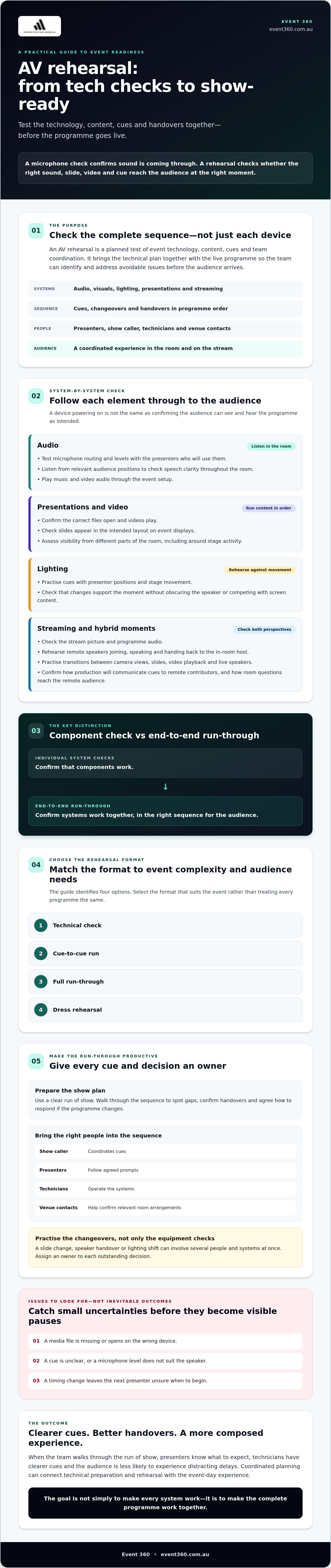
A microphone check can confirm that sound is coming through. It can’t show whether the right slide appears as a presenter takes the stage, a video starts on cue or the next speaker knows when to step forward. The importance of AV rehearsals lies in testing the complete sequence, not just individual pieces of equipment.
An AV rehearsal is a planned test of event technology, content, cues and team coordination, designed to identify and address avoidable issues before the audience arrives. It’s where the technical plan meets the live programme. A technical rehearsal similarly brings elements such as sound and lighting together with the action they support.
For a broader view of how technology supports an event, see the Guide to Audio Visual Production for Impactful Events. This guide focuses on how rehearsal turns that production plan into a sequence people can deliver with confidence.
What does an AV rehearsal actually test?
Follow the signal paths from microphones and playback devices through to the audience-facing sound and displays. Check that presentation files and video content are ready to play, screens are visible from around the room, and lighting cues support each moment. The aim is to confirm not only that each element works, but that it works at the right point in the programme.
People need clear roles in the sequence, too. The show caller coordinates cues, presenters follow agreed prompts, technicians operate the systems, and venue contacts help confirm relevant room arrangements. Practise the changeovers as well as the equipment checks. A slide change, speaker handover or lighting shift can involve several people and systems at once.
What can go wrong without a rehearsal?
Small uncertainties can become visible pauses. A media file might be missing or open on the wrong device. A cue may be unclear, a microphone level may not suit the speaker, or a timing change may leave the next presenter unsure when to begin. These are issues to check for, not inevitable results of skipping a rehearsal.
Walking through the run of show gives the team a chance to spot gaps, confirm handovers and agree how to respond if the sequence changes. Presenters know what to expect, technicians have clearer cues, and the audience is less likely to experience distracting delays. That coordination supports a composed experience in the room and for anyone watching remotely.
What an AV rehearsal should test across sound, visuals, lighting, and streaming
Go beyond checking that each device powers on. Follow content and cues through the full production setup, so the team can assess what each audience will actually experience. The importance of AV rehearsals becomes clear when separate systems need to work together in real time.
Individual system checks confirm that components work. An end-to-end run-through confirms they work together, in the right sequence for the audience.
How should the team test audio and visual systems?
Start with audio. Test microphone routing and levels with the presenters who’ll use them, then listen from relevant audience positions to check that speech is clear throughout the room. Play music and video audio through the event setup as well. A signal at the control position doesn’t necessarily show how the sound reaches the audience.
Next, run presentation content in order. Confirm that the correct files open, videos play and slides appear in the intended layout on event displays. Check visibility from different parts of the room, including whether key text and visuals remain clear around stage activity. Then rehearse lighting cues against presenter positions and stage movement. Each change should support the moment without obscuring the speaker or competing with screen content.
What extra checks matter for hybrid events?
Treat the in-room and streamed programmes as one connected show. Check the stream picture and programme audio, then rehearse remote speakers joining, speaking and handing back to the in-room host. Practise transitions between camera views, slides, video playback and live speakers. Confirm how the production team will communicate cues to remote contributors.
Follow the sequence from both perspectives. A handover that works in the room should also make sense on the stream, and questions from the room need a clear path into the remote audience’s experience. For wider planning considerations, consult the Hybrid Event Solutions guide.
For programmes that combine multiple systems or remote contributors, coordinated planning can bring checks and show cues together. Learn more about Event 360’s audio visual production.
Which AV rehearsal format suits your event’s complexity?
There’s no single rehearsal format that every event needs. Match the scope to the programme, the number of systems and handovers, and what presenters and audiences will experience. A short technical check may suit a straightforward session, while a multi-presenter or hybrid programme may benefit from a run-through of the full sequence. The importance of AV rehearsals is in choosing the right checks, not adding complexity for its own sake.
When is a technical check or cue-to-cue run enough?
A focused technical check may be proportionate when the programme is short and straightforward. Use it to confirm equipment readiness and test higher-stakes moments, such as a video introduction or speaker handover. A cue-to-cue run focuses on selected transitions, helping the team clarify timing and responsibilities without repeating every speech or presentation.
Neither format replaces planning. Agree what needs testing based on the event brief, venue access and production plan. If a change affects several cues or people, include that moment in the run.
When does a full or dress rehearsal add value?
Consider a full run-through when multiple presenters, live content, complex cues or hybrid audience interactions depend on one another. Rehearsing the sequence can reveal where timing slips, handovers feel unclear or teams need a different prompt. A dress rehearsal goes further by bringing the planned production elements together in show conditions.
Rehearsals aren’t just for performers. Presenters need to understand their cues, while technicians and production leads need to coordinate their actions. Discuss the format with the production lead rather than treating a full or dress rehearsal as a fixed requirement. Choose the lightest format that gives the team confidence in the moments that matter.
How to plan a productive AV rehearsal before event day
A productive rehearsal starts before anyone enters the room. Confirm the latest programme, what needs testing and what information or access each participant needs. This preparation keeps the session focused on resolving issues, rather than finding files or clarifying the schedule. It’s a practical way to put the importance of AV rehearsals into action.
What should organisers prepare before the rehearsal?
Ask the production lead to review the plan and flag unresolved decisions or dependencies before the team gathers. Confirm venue access and technical setup, then share the current run of show, presenter details, transitions and final presentation content. For hybrid events, include remote contributors in the plan and confirm how they’ll join and communicate with the production team.
Invite the people who need to make or act on decisions: the production lead, relevant technicians, presenters, an organiser or show caller, and venue contacts where needed. Ask them to bring:
The latest run sheet and cue notes, with changes clearly marked.
Current presentation files and any video or audio content for playback.
Speaker details, including names, order and any specific handover needs.
A shared, agreed method for communicating cues and updates during the session.
A rehearsal run sheet is the shared sequence of timings, cues and handovers that helps every participant know what happens next and who is responsible. Assign an owner to each open decision, such as confirming a content change or approving a revised transition. This makes it clear who will resolve the issue and by when.
How should the team run and document the session?
Work through the programme in order, testing each cue and transition with the people responsible for carrying it out. Communicate changes clearly to the relevant operators and presenters, then pause where needed to confirm everyone has the same instruction. If a change affects later cues, update the run sheet instead of relying on memory.
Keep a shared action log alongside the run sheet. Record the issue, the decision made, the person responsible and the required follow-up. Separate problems that need an immediate fix and retest from changes that require approval or updated content. Before wrapping up, review outstanding actions with their owners and confirm the next version of the programme documents.
Event 360’s professional AV production can bring technical planning, rehearsal and event delivery into a connected process.
How an AV production partner helps turn rehearsal into event-day readiness
A rehearsal is most useful when its decisions carry through to event day. An AV production partner can connect technical planning, equipment setup, cue coordination and onsite support, helping the team work from a shared production plan. The right scope depends on the event. A straightforward programme may need a focused set of checks, while multiple presenters, live content or remote audiences can require more coordination. That’s the practical value of AV rehearsals: tested priorities, clear responsibilities and fewer unknowns.
What should you share with your AV production team?
Start with the event’s objectives and latest programme. Share presenter requirements, planned audience interactions and any moments that rely on a particular cue or content change. Flag production needs early, such as livestreaming, hybrid participation, LED displays or creative content, so the rehearsal plan reflects the experience you’re building.
Discuss venue conditions that could affect setup or the run-through, and agree how updates will reach the people who need to act on them. A late programme change, for example, may affect a presenter’s cue, a content file and the timing of the next transition. Confirm who will update the run of show and how the production team will receive the latest version. If you’re comparing the type of support an event may need, the AV Hire Australia buyer’s guide can provide a broader starting point.
How do you know the event is ready to go live?
Readiness isn’t a promise that nothing can go wrong. It means the team has tested its priorities and knows how to respond. Before the event, check that:
Critical cues and current content versions have been reviewed.
Relevant system checks are complete, with follow-up actions assigned to an owner.
Presenters and production staff understand the run of show and their roles.
The team knows how changes or issues will be escalated and communicated.
Event 360 can tailor AV production to connect technical planning, rehearsal cues and onsite coordination, with the scope shaped around the event’s requirements. A clear plan gives presenters and production staff a shared reference point while leaving room to manage changes calmly.
To discuss the technical requirements for your event, explore Event 360’s AV production services.
Make your next event feel ready to go live
A strong rehearsal is more than a final equipment check. Choose a format that fits your programme, test how key cues and content work together, and give presenters and production teams a shared plan for event day. That’s the importance of AV rehearsals: helping turn technical details into a coordinated experience for people in the room and watching remotely.
For events with several systems or moving parts, a production partner can connect technical planning, rehearsal and onsite coordination. Event 360’s project-based AV production includes sound, visual displays, lighting, LED walls, live streaming and hybrid event solutions, with the production scope shaped around the event’s needs.
Ready to plan the technical side of your event? Talk with Event 360 about your event’s AV production. With clear priorities and the right people aligned, your team can approach showtime prepared and focused.
Frequently Asked Questions
What is an AV rehearsal?
An AV rehearsal is a planned test of an event’s technology, content, cues and team coordination. It may include checking microphones and playback, running presentation slides, testing lighting changes and practising speaker handovers. The team follows some or all of the programme to confirm how these elements work together. Unlike a quick equipment check, a rehearsal also tests timing and responsibilities, helping presenters and technicians understand what happens next.
Why are AV rehearsals important for an event?
The importance of AV rehearsals is that they give the team a chance to identify and address potential technical or timing issues before the audience arrives. A file may need updating, a cue may be unclear, or a transition may take longer than expected. Rehearsing helps presenters, technicians and production leads align on the sequence and their roles, supporting a more composed experience for people attending in person or watching remotely.
Can a small event skip an AV rehearsal?
A small event may not need a full run-through, but it should still allow time for checks suited to its technical setup. A focused check might cover microphone levels, presentation playback and the key speaker handover. If the programme is simple, this can be brief. If it includes multiple presenters, video or streaming, include those elements too. Choose the rehearsal scope based on the programme and production plan, rather than event size alone.
How long should an AV rehearsal take?
There’s no fixed duration for an AV rehearsal. It depends on the programme length, the number of presenters and cues, the systems involved, and whether content or remote contributors need testing. A technical check may be shorter than a full sequence run-through. Work backwards from venue access and setup requirements, then allow time to address issues and retest affected cues. Agree the schedule with the production lead so the rehearsal has clear priorities.
What happens if a technical issue is found during rehearsal?
If the team finds an issue, record what happened, who owns the fix and whether it needs approval or updated content. For example, a technician may adjust a microphone level, while an organiser confirms a revised slide or programme order. Retest changes that affect cues or the audience experience, and update the shared run sheet so everyone has the current information. If a fix can’t be confirmed during rehearsal, agree how the team will manage it on event day.
Do hybrid events need a separate AV rehearsal?
Hybrid events need the streamed experience tested as well as the in-room setup, but that doesn’t always mean scheduling a separate rehearsal. Include stream picture and programme audio, remote-speaker connections, playback and handovers in the main run-through where practical. Give remote contributors clear joining instructions and a way to communicate with the production team. If their connection or role needs extra attention, arrange a focused check as part of the overall rehearsal plan.
Who should attend an AV rehearsal?
Invite the people who need to make decisions or deliver cues: the production lead, relevant technicians, presenters, the organiser or show caller, and venue contacts where their input is needed. Include remote speakers for the parts of the run-through that involve them. Each attendee should know their role and bring the information or content they’re responsible for. Keep the group focused on the programme, decisions and transitions they need to test together.


Comments