%20(1).png)
Managing Q&A for a Hybrid Audience: The Ultimate 2026 Guide to Seamless Engagement

What if your remote audience isn't actually engaged, but is simply waiting for a reason to close their browser tab? It's a common fear for organisers who have watched a vibrant in-person discussion stall the moment a virtual question is read out three minutes too late. Successfully managing Q&A for a hybrid audience isn't about running two parallel sessions. It's about using precision AV production to create a single, shared digital centre where every participant, whether they are in a local ballroom or a home office, feels equally heard.
We understand the frustration of audio feedback loops and those awkward silences that drain the energy from a room. You want a seamless flow where the transition between physical and digital microphones is completely invisible. This guide provides the technical and strategic blueprint to master that art. We'll walk you through the latest 2026 latency standards, hardware configurations, and moderation tactics that eliminate friction. By the end of this article, you'll know exactly how to deliver a unified, professional event that keeps your entire audience on the edge of their seats from the first question to the final wrap-up.
Table of Contents
The Hybrid Participation Gap: Why Q&A Often Fails
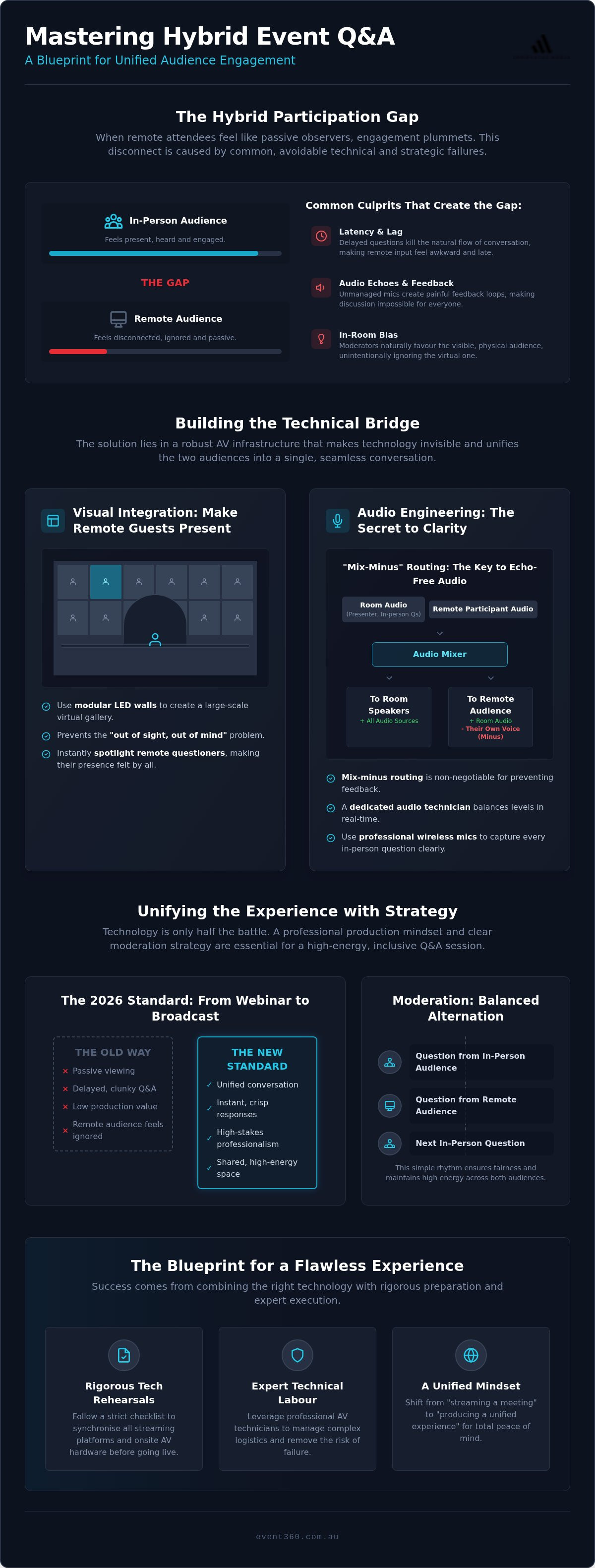
The "Participation Gap" isn't just a technical glitch; it's a psychological barrier that turns active delegates into passive observers. When remote attendees feel like they're merely watching a broadcast rather than participating in a live forum, their engagement levels plummet. This often happens because the session fails to bridge the physical and digital divide effectively. Understanding What is a Hybrid Event? requires recognising that both audiences deserve an identical seat at the table. When managing Q&A for a hybrid audience, the goal is to ensure every participant feels the energy of the room, regardless of their coordinates.
Latency and audio lag are the primary culprits behind lost momentum. Successfully managing Q&A for a hybrid audience means eliminating the three-second delay that creates a disjointed experience where the speaker has already moved on before the virtual question is heard. This friction destroys the natural cadence of a conversation. For a high-stakes corporate event, "good enough" AV production is a massive risk to your brand. It projects a lack of preparation and technical mastery. High-definition LED walls are essential here; they provide the visual presence needed to remind the onsite audience and speaker that the virtual participants are truly in the room.
Common Pitfalls in Hybrid Engagement
In-room bias is a frequent hurdle where moderators instinctively favour the physical front row. It's human nature to engage with the person standing right in front of you, but this leaves your digital audience in the dark. Technical "ghosting" occurs when remote questions pile up on a dashboard that the moderator can't see or chooses to ignore because the interface is clunky. Perhaps most damaging are audio echoes. Without professional routing, unmanaged mic feeds can create a feedback loop that makes it impossible for anyone to hear the discussion clearly.
The 2026 Standard for Professional Events
The days of simple "webinar-style" Q&A are over for the Australian MICE sector. High-end corporate delegates now expect broadcast-quality production that mirrors what they see on professional news networks. They want crisp visuals, instant responses, and a sense of shared space. We define hybrid Q&A as the technical synchronisation of two distinct environments into one conversation. Achieving this requires a shift in mindset from "streaming a meeting" to "producing a unified experience" where technology removes every trace of friction.
Building the Technical Bridge: AV Essentials for Hybrid Q&A
While software polling tools are helpful, they are merely the interface. The real magic happens in the hardware layer. Effectively managing Q&A for a hybrid audience requires a physical bridge that allows your onsite and remote participants to see and hear each other with zero friction. Without the right AV infrastructure, your virtual guests remain "ghosts" in the machine, disconnected from the energy of the live room. We focus on removing these technical barriers to ensure a unified experience.
Visual Integration: LED Walls and Displays
High-definition LED walls are the ultimate solution for visibility. Instead of tucking remote participants away on a small confidence monitor, we use modular LED panels to create a "Gallery View" that looms large behind or beside the stage. This prevents the "out of sight, out of mind" syndrome. When a speaker can see the faces of hundreds of virtual delegates on a crisp, bright display, they naturally engage with them. Linking your Q&A dashboard directly to these visual displays allows for seamless transitions where a remote questioner can be spotlighted instantly, making their presence felt by everyone in the room.
Audio Engineering for Two Rooms
Audio is the most complex part of the hybrid equation. To prevent the dreaded feedback loop, we employ "mix-minus" routing. This technical setup ensures that remote participants hear everything in the room, including the presenter and other questions, but their own voice is subtracted from the feed they receive. It is the secret to clear, echo-free communication. Without this precise routing, the session can quickly devolve into a series of painful audio glitches that frustrate both audiences.
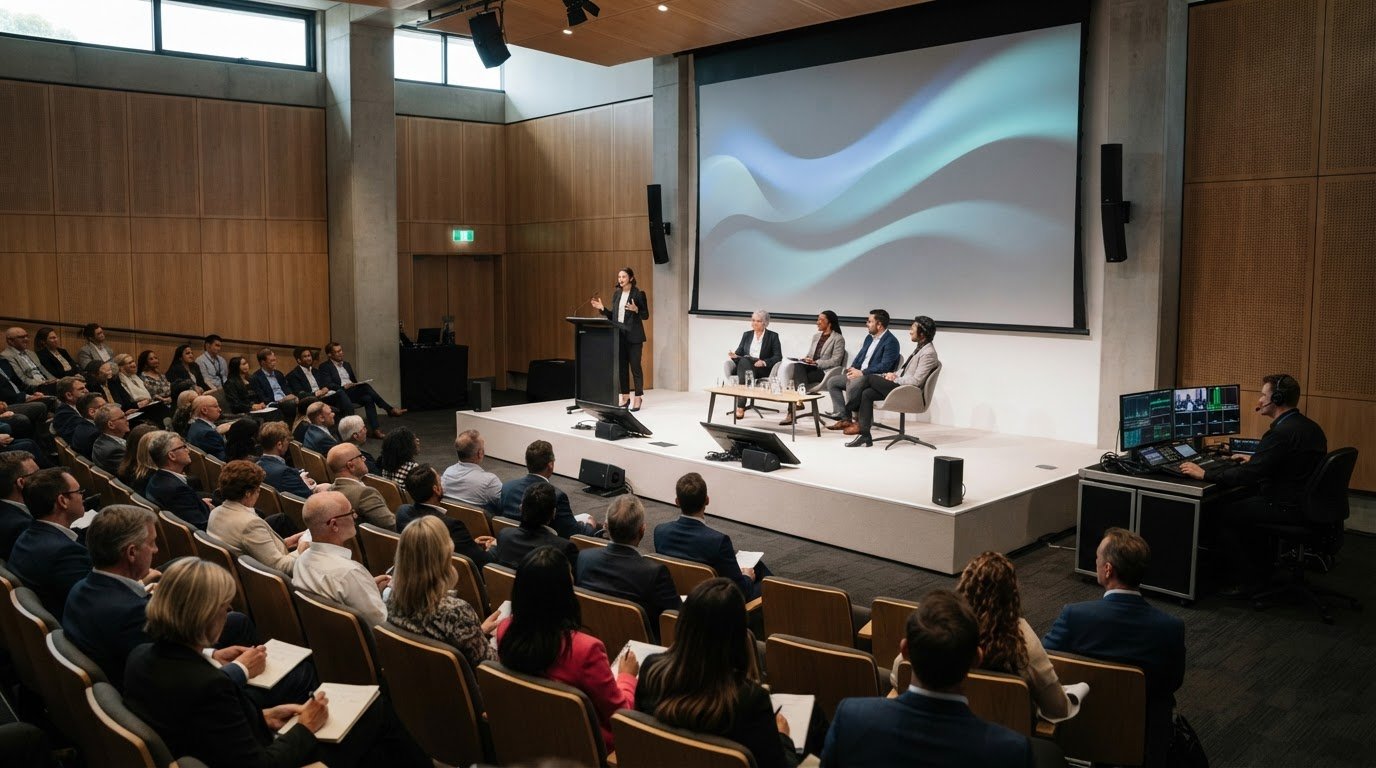
Managing the physical room is equally vital. Professional wireless microphone management ensures that every in-person question is captured for the remote audience. A dedicated audio technician is essential for real-time level balancing, ensuring that a soft-spoken remote participant is heard as clearly as a loud voice in the front row. This level of detail is what separates a standard meeting from a high-end production.
Low-latency live streaming services act as the backbone of this interaction. In 2026, even a two-second delay can kill the momentum of a fast-paced session. By integrating multi-camera switching, we capture the "vibe" of the room, showing the remote audience the reactions and the scale of the event. This visual context makes them feel like part of the crowd rather than just a spectator. If you're planning a large-scale conference, investing in professional hybrid event solutions ensures these technical intricacies are handled with precision, leaving you free to focus on the conversation.
Choosing Your Moderation Strategy: Digital-First vs. Balanced
Strategy is the invisible hand that guides a session's energy. When managing Q&A for a hybrid audience, you cannot leave the flow to chance. You need a structural model that ensures equity and maintains momentum across two different environments. Without a clear framework, the session often defaults to the people physically closest to the stage, leaving your virtual delegates feeling like second-class citizens. We recommend choosing a model that reflects your event's specific goals and audience split.
The Digital-First Model intentionally prioritises remote voices. It is a powerful way to signal to your virtual delegates that they are a priority. This approach works exceptionally well for global town halls where the remote contingent might outnumber those in the room. By giving them the first slot, you set a tone of inclusivity from the start. Conversely, the Balanced Alternation Model is the gold standard for high-energy sessions. It involves a strict rhythm: one question from the floor, followed by one from the digital dashboard. This keeps both audiences alert and prevents either group from feeling ghosted.
To manage the volume of digital input, implement an up-voting system. This allows the audience to filter for the most impactful questions, saving the moderator from digging through noise in real-time. We also suggest appointing a Virtual Emcee. This person acts as a dedicated advocate for the remote crowd, ensuring their presence is felt on stage and their questions are delivered with the intended tone and urgency.
The Role of the Digital Moderator
A dedicated digital moderator is the glue between the tech desk and the stage. This person doesn't just read text; they curate the feed and liaise with the audio technicians to ensure the next remote questioner is ready to be spotlighted. They are also responsible for briefing speakers before they step on stage. A quick reminder to the presenter to acknowledge the camera as a living audience member can transform the remote experience from passive viewing to active participation.
Comparison: Which Model Suits Your Event?
Choosing a model depends on your specific objectives. Digital-First is ideal for global equity. Balanced alternation is perfect for fast-paced Australian corporate conferences where the "vibe" of the room is a key selling point. Your choice should always align with the complexity of your audio visual production setup. If you have the hardware and technical labour to support it, the balanced model offers the most professional and seamless flow for a high-end production.
Execution Masterclass: A Step-by-Step Hybrid Q&A Checklist
Execution is where strategy meets reality. Managing Q&A for a hybrid audience requires a meticulous approach to the live moment, ensuring that your technical infrastructure and human talent work in perfect harmony. It isn't enough to simply have the gear; you need a rehearsed sequence that accounts for every variable. Successful organisers treat the Q&A segment as a high-stakes broadcast, moving away from a casual "any questions?" approach toward a tightly produced programme that eliminates friction for every participant.
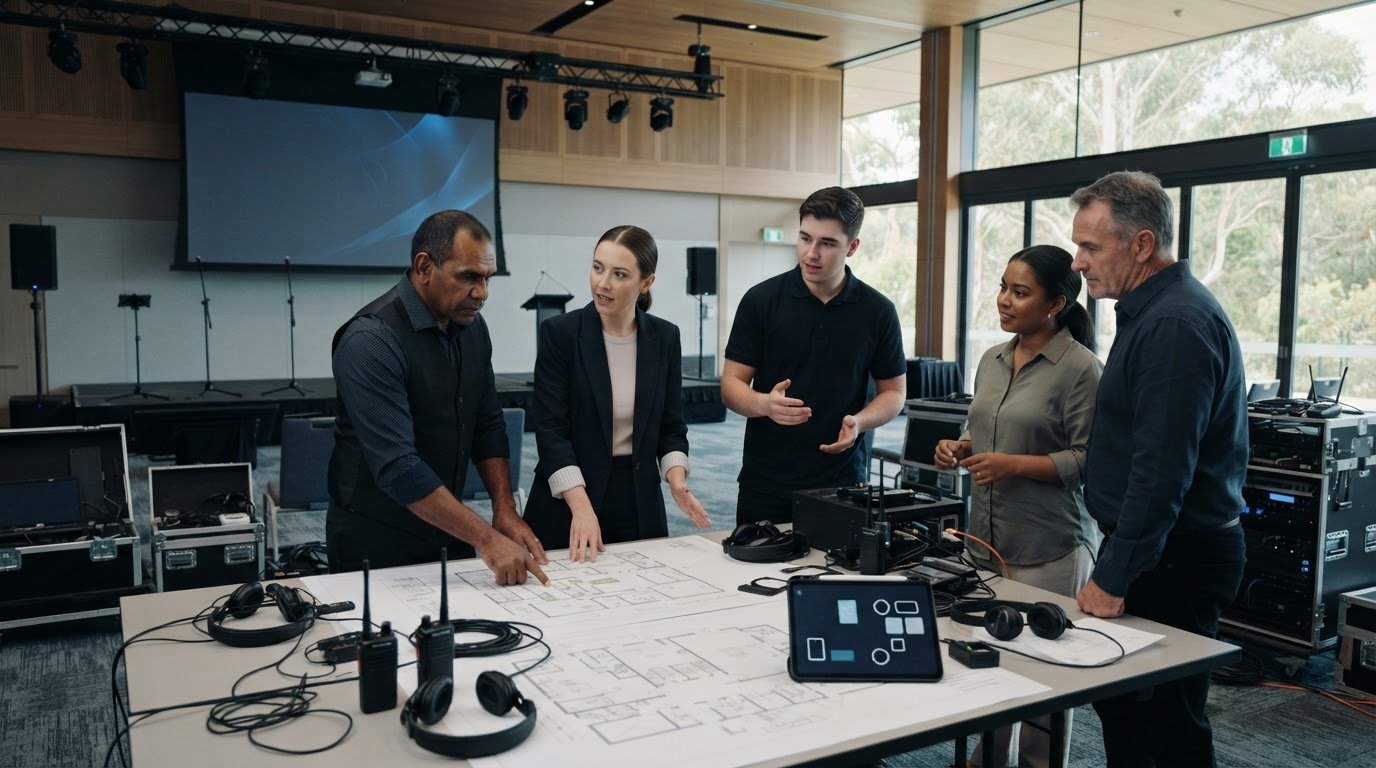
Before the first delegate enters the room, your team must synchronise the streaming platform with the onsite AV hardware. This involves more than just a signal check. It's about ensuring the data flow from your digital dashboard to the stage monitors is instantaneous. We recommend a full end-to-end dry run to identify any bottlenecks in the digital bridge. This preparation allows you to manage the flow with confidence, avoiding the "dead air" trap that often occurs when a moderator is left waiting for a digital question to load.
The Technical Rehearsal
The "talk-back" circuit is your secret weapon. This dedicated audio line allows the moderator to communicate with the tech desk without the audience hearing a word. It's essential for cueing the next remote questioner or flagging a technical issue before it becomes visible. During the rehearsal, we check for video lag on the LED wall hire displays to ensure that when a virtual attendee speaks, their lips move in perfect sync with the house audio. We also verify that the "Slido" or "Pigeonhole" feed is clearly visible to the stage presenter, allowing them to see upcoming questions without turning their back on the physical audience.
Setting the Stage for Success
Establishing ground rules at the start of the session is vital. We use the "Camera First" rule: speakers are coached to look directly into the lens when answering remote questions, creating a sense of direct eye contact for those at home. You must also plan for "rogue" mic users in the physical room. If someone starts shouting a question without a microphone, the remote audience hears nothing but muffled noise. Your moderator must be trained to politely pause the speaker until a roaming mic arrives, or repeat the question for the benefit of the stream. Closing the session is just as important; always validate both audiences equally to ensure no one feels like an afterthought.
Once the event concludes, don't let the momentum fade. Capturing data and analytics is essential for stakeholder reporting, providing insights into which topics resonated most and how the engagement split looked between rooms. If you want to ensure your next event runs with this level of precision, partner with our technical experts to handle the complex logistics on your behalf.
The Event 360 Edge: Professional AV for Peace of Mind
Professional technical labour is the invisible engine that drives every successful hybrid Q&A. While the hardware provides the platform, it's the expertise behind the desk that ensures the energy stays high and the transitions remain seamless. Managing Q&A for a hybrid audience involves juggling dozens of variables simultaneously, from audio levels to digital dashboard moderation. Our team steps in as your dedicated ally, taking the weight of these complex logistics off your shoulders so you can focus entirely on your speakers and your message. We don't just provide gear; we provide the certainty that your event will flow without a single technical hiccup.
Our customised hybrid event solutions are specifically tailored for large-scale MICE applications across the Australian market. We understand that a high-end corporate conference has vastly different requirements than a small internal meeting. By removing the friction of technical sync and audio routing, we transform a potentially stressful segment into a highlight of your programme. Our "can-do" attitude means we approach every challenge with a solution-oriented mindset, turning intricate technical requirements into high-impact visual moments that resonate with every delegate.
Expertise You Can Rely On
Deep local venue knowledge is a critical factor in delivering world-class audio visual australia setups. We understand the specific acoustic and layout challenges of major Australian event spaces, allowing us to plan for optimal microphone placement and LED wall positioning long before the bump-in begins. Our skilled technicians thrive in the high-stakes environment of live production, providing real-time support that guarantees a flawless sync between your physical and virtual rooms. From the initial concept to the final execution, our end-to-end philosophy ensures that your vision is translated into a professional, high-energy reality.
Ready to Elevate Your Next Hybrid Event?
A "one-size-fits-all" approach rarely works when the goal is true audience engagement. We believe in bespoke packages that align with your specific event goals, whether you're hosting a global town hall or a national industry summit. The impact of professional lighting and broadcast-quality sound cannot be overstated; it's what makes your remote guests feel valued and your in-person audience feel the prestige of the occasion. If you're ready to move beyond basic webinars and deliver a unified conversation that truly connects, contact the Event 360 Pty Ltd team to organise your hybrid technical plan and experience total peace of mind.
Transform Your Next Hybrid Conversation into a Unified Experience
Mastering the art of managing Q&A for a hybrid audience is the difference between a fragmented event and a world-class production. By bridging the participation gap with high-definition LED walls and precision audio routing, you ensure that every voice carries weight. Whether you choose a digital-first approach or a balanced alternation model, the success of your session relies on a robust technical foundation and a clear moderation strategy that treats every delegate as a priority.
You don't have to handle these complex logistics alone. As specialists in MICE and corporate events, Event 360 provides the state-of-the-art LED wall and live streaming equipment needed to bring your vision to life. Our team offers full technical labour and onsite support, removing every trace of friction to give you total peace of mind during the most high-stakes moments of your programme.
It's time to move beyond simple broadcasts and create a truly interactive stage where everyone feels heard. Partner with Event 360 for your next hybrid event and watch your audience engagement soar. We are ready to help you deliver a flawless, high-energy experience that leaves a lasting impact on every participant.
Frequently Asked Questions
What is the best way to manage questions from two different audiences simultaneously?
Managing Q&A for a hybrid audience is most effective when you use a unified digital dashboard alongside a "Balanced Alternation" moderation strategy. This rhythm ensures that one question from the physical floor is followed by one from the virtual platform. It prevents either group from feeling secondary. By synchronising these feeds through a central tech desk, you maintain a professional flow that keeps the energy high in both the room and the stream.
How do I prevent audio feedback during a hybrid Q&A session?
Implement a "mix-minus" audio routing setup to eliminate feedback loops and echoes. This technical configuration ensures that remote participants hear everything in the venue except their own voice feed. It is the industry standard for professional hybrid events. Additionally, using high-quality wireless microphones and having a dedicated audio technician onsite allows for real-time level balancing, which is essential for a seamless and clear conversation.
Do I need a separate moderator for the virtual audience?
Yes, appointing a dedicated digital moderator or "Virtual Emcee" is highly recommended for professional engagement. This person acts as an advocate for the remote crowd, curating the dashboard and filtering the most impactful questions via an up-voting system. They bridge the gap between the virtual chat and the stage presenter, ensuring that the digital audience's presence is felt and their contributions are delivered with the correct tone and urgency.
What AV equipment is essential for a professional hybrid Q&A?
Essential hardware includes high-definition LED walls for displaying remote participants, professional wireless microphone systems, and low-latency streaming encoders. LED walls are particularly effective because they bring the virtual audience into the room visually. You also need a multi-camera setup to capture the room's vibe and a sophisticated audio mixer capable of handling complex mix-minus routing to ensure everyone hears the discussion clearly without technical lag.
How can I make remote attendees feel more included in the live discussion?
Prioritise visual presence by displaying virtual participants on large-scale LED screens within the venue. When managing Q&A for a hybrid audience, encourage speakers to look directly into the camera lens when answering digital questions to create a sense of eye contact. Using a "Digital-First" moderation model can also help. This prioritises remote voices early in the session, signalling that their participation is just as valued as those physically present.
What happens if the internet connection drops during the Q&A?
Professional production teams mitigate this risk by using redundant internet connections and bonded cellular hardware. If a primary line fails, the system automatically switches to a backup without interrupting the stream. We also recommend having a "holding" slide ready to maintain a professional look while the tech desk resolves the issue. Onsite technical support is vital here to manage these complex logistics and ensure the event continues smoothly.
How do I choose between different Q&A software platforms for hybrid events?
Select a platform based on its ability to integrate directly with your onsite AV hardware and streaming dashboard. Look for features like real-time up-voting, moderation filters, and low-latency data sync. Popular choices in the Australian MICE sector often include Slido or Pigeonhole, but the best fit depends on your specific event scale. Our team can help you evaluate these options as part of a customised hybrid technical plan.
Is it worth hiring a professional AV company for a small hybrid meeting?
It is absolutely worth it if your corporate brand and executive reputation are on the line. Even small meetings suffer from audio echoes and participation gaps that can make the session feel amateur. Professional AV production removes the friction of technical planning and provides peace of mind. By leveraging skilled technicians and high-end gear, you ensure a high-energy, seamless experience that keeps every participant focused on the content.
Comments